Button Text! Submit original article and get paid. Find out More

Latest

Monday, 30 December 2013

The technology is evolving at a great speed, Everything has been modified in some way or the other and a better way to get that work done is invited. Similarly the team lead by Jacob Eichbaum have change the way we type by their very first product Grippity 1 way back in the year 2010. But this was not just the end , The Grippty 1 team worked hard and made a brand new product Grippity Transparent Tablet which aims to be the first transparent tablet of the world.


Grippity is currently a project over at Kickstarter that aims to become the world’s first transparent Android tablet. The Grippity have 123 backers and $22,283 pledged of $199,000 goal till today and it have more 29 days to go. The Grippity Kickstarter discription says that –“Grippity is a totally new way of looking at input – A transparent, dual sided multi-touch display that enables you to lean back in your most comfortable chair (or even stand or lie down) and use ALL TEN fingers, while keeping your palms at a neutral ergonomic posture. It also enables you to accurately touch (the back of) small menu items and buttons on websites and software that were originally designed for desktops. As Grippity is running Android, you can download or develop apps for your specific needs.”

THE GRIPPITY TRANSPARENT TABLET IS MADE UP OF THE FOLLOWING COMPONENTS :

  • Li-io Battery ,
  • Android Tablet Board
  • Transparent display and capacitive touch
  • Charging cradle
  • Front Cover
  • Capacitive multi touch panel USB interface
  • Main frame
  • Back finger’s lighting LED
Grippity making

TECHNICAL SPECIFICATIONS

The Grippity transperent tablet have a Semi-Transparent 7″ LCD display with a resolution of 800px X480px. It have Upper 25% non-transparent portion for thumbs input.It also consist of Back sided capacitive multi-touch panel which is another great feature of this tablet.The Front sided capacitive multi-touch panel is availabe with extended programmable touch area. This grippity transparent tablet runs on android version 4.2 and might be able to upgrade to 4.4 if possible. This Tablet have ARM processor – Cortex A8 512K RAM. The specification is not over yet, It also consist a IR transmitter to control TV’s and DVD’s.

VIDEO :

This Grippity transparent tablet is able to change the way people type on their mobile devices, this device promote to use all the fingers to type rather than using only thumbs. Grippity can be used not just as a tablet, but also like a remote control, game controller, and media center keyboard. Since there is a long way to go for the Grippity transparent tablet to raise fund atKickstarter, we at Above Android wish that this project reach the $199,000 goal. Last but not 
Grippity christmas

News

WORLD’S FIRST GRIPPITY TRANSPARENT TABLET WITH MULTI SIDED TOUCH PANEL

Unknown  |  at  07:52

The technology is evolving at a great speed, Everything has been modified in some way or the other and a better way to get that work done is invited. Similarly the team lead by Jacob Eichbaum have change the way we type by their very first product Grippity 1 way back in the year 2010. But this was not just the end , The Grippty 1 team worked hard and made a brand new product Grippity Transparent Tablet which aims to be the first transparent tablet of the world.


Grippity is currently a project over at Kickstarter that aims to become the world’s first transparent Android tablet. The Grippity have 123 backers and $22,283 pledged of $199,000 goal till today and it have more 29 days to go. The Grippity Kickstarter discription says that –“Grippity is a totally new way of looking at input – A transparent, dual sided multi-touch display that enables you to lean back in your most comfortable chair (or even stand or lie down) and use ALL TEN fingers, while keeping your palms at a neutral ergonomic posture. It also enables you to accurately touch (the back of) small menu items and buttons on websites and software that were originally designed for desktops. As Grippity is running Android, you can download or develop apps for your specific needs.”

THE GRIPPITY TRANSPARENT TABLET IS MADE UP OF THE FOLLOWING COMPONENTS :

  • Li-io Battery ,
  • Android Tablet Board
  • Transparent display and capacitive touch
  • Charging cradle
  • Front Cover
  • Capacitive multi touch panel USB interface
  • Main frame
  • Back finger’s lighting LED
Grippity making

TECHNICAL SPECIFICATIONS

The Grippity transperent tablet have a Semi-Transparent 7″ LCD display with a resolution of 800px X480px. It have Upper 25% non-transparent portion for thumbs input.It also consist of Back sided capacitive multi-touch panel which is another great feature of this tablet.The Front sided capacitive multi-touch panel is availabe with extended programmable touch area. This grippity transparent tablet runs on android version 4.2 and might be able to upgrade to 4.4 if possible. This Tablet have ARM processor – Cortex A8 512K RAM. The specification is not over yet, It also consist a IR transmitter to control TV’s and DVD’s.

VIDEO :

This Grippity transparent tablet is able to change the way people type on their mobile devices, this device promote to use all the fingers to type rather than using only thumbs. Grippity can be used not just as a tablet, but also like a remote control, game controller, and media center keyboard. Since there is a long way to go for the Grippity transparent tablet to raise fund atKickstarter, we at Above Android wish that this project reach the $199,000 goal. Last but not 
Grippity christmas


Have you ever missed out on any of your android notifications? Of course yes, Sometimes it just  happens that you clear some of your important notifications along with the not so important ones. Now the question that arises is ,Where did they go ? How can you get back old notifications ? And many such questions would cross your mind at that instance. So here we provide you the solutions to all these questions of yours.


Well the sad part is that you can get back all these old notifications only if your android phone works on android version 4.3 (Jelly Bean) or above. So here are the steps that you must follow to get back your old notifications :
    1. Go to your home screen and tap on apps icon
    2. Go to widget Section and scroll till you get 1*1 Setting Shortcut widget
    3. Drag and Drop into your home screen

  1. will open. Select Notifications.
  2. The Notification Shortcut will appear on your screen, Tap on it
  3. You will be able to check all your previous notifications.
If you face any problem in how to get back old notifications , then freely comment in the below comment box. Also like share and tweet the article if you liked it.


How To

HOW TO GET BACK OLD NOTIFICATIONS INTO YOUR ANDROID PHONE

Unknown  |  at  07:39


Have you ever missed out on any of your android notifications? Of course yes, Sometimes it just  happens that you clear some of your important notifications along with the not so important ones. Now the question that arises is ,Where did they go ? How can you get back old notifications ? And many such questions would cross your mind at that instance. So here we provide you the solutions to all these questions of yours.


Well the sad part is that you can get back all these old notifications only if your android phone works on android version 4.3 (Jelly Bean) or above. So here are the steps that you must follow to get back your old notifications :
    1. Go to your home screen and tap on apps icon
    2. Go to widget Section and scroll till you get 1*1 Setting Shortcut widget
    3. Drag and Drop into your home screen

  1. will open. Select Notifications.
  2. The Notification Shortcut will appear on your screen, Tap on it
  3. You will be able to check all your previous notifications.
If you face any problem in how to get back old notifications , then freely comment in the below comment box. Also like share and tweet the article if you liked it.


Sunday, 29 December 2013


Gregory Lee, president of Samsung telecommunication recently launched the phone which was most awaited by the people Samsung Galaxy Note 3. They also launched the Galaxy Gear Smart watch in the event at Berlin. Note 3 is the third phablet and the next generation phone with screen of 5.7 inches. This Smartphone includes many new features apart from the features of previous Smartphone. This device will run on Jelly Bean which is 4.3.

What’s new in Samsung Galaxy Note 3?
This Smartphone is an evolution in the Android World. It has many new and exclusive features which makes it apart from this world. The Other version of note had the feature of Multi-window which is included in Note 3 with a Smart change in it. The main new features are as follows:
  1. Running the same app in two different windows.
  2. The S pen window which allows user to call up in between of any running app without interrupting it.
  3. Multi Vision lets multiple users of the Galaxy note 3 actually combine their displays to display a single image.
  4. The Samsung KNOX feature used for security.
This were the main new features included in Samsung Galaxy Note 3 Which are further explained below

  • Display, Sound, Body and Camera:
With the screen of 5.7 inches, it has a super AMOLED capacitive touchscreen with 16M colors. It has high definition resolution of 1080 X 1920 pixels. It obviously supports multi-touch.  It also supports the Air-Touch which is seen in recently launched Galaxy Smartphone’s like S4, Note 2. It comes along with an S pen stylus. It has a universal jack of 3.5mm for Headphones.  It has soft velvet like exterior with classic looks and style, available in 3 colors (Jet Black, Classic White and Blush Pink) till now. Samsung has created a cover especially for Note 3 which leaves a Small Space visible to have quick asses to the notifications. This next generation of smartphone is supported with the 13 MP camera giving 4128 x 3096 pixels of pictures. It also supports Dual Shot, Simultaneously HD video and image recording, Geo tagging, touch focus, face and smile detections and HDR. Its Secondary camera is of 2MP giving a new experience of Video calling.


  • Processor and Battery:
This Smartphone has Android OS, v4.3 (jelly bean). CPU of Quad-core 2.3 GHz / Quad-core 1.9 GHz Cortex-A15 And quad-core 1.3 GHz Cortex-A7 (3G model). It supports various sensors such as Accelerometer, Gyro, Proximity, compass, Barometer, Temperature, Humidity, and Gestures. It also features Messaging, Browser, Radio, GPS and Java.
The battery life of this Smartphone works a day even after using it rough which includes Gaming, Chatting, Wi-Fi and many more. Precisely it has Li-lon 3200 mAh battery. Its stand-by time and talk time is not disclosed by now.

  • Security (Samsung KNOX):
The Samsung Company has outfitted the Galaxy Note 3 with its enterprising-grade KNOX software. As this smartphone is an evolution to world of Smartphone it had to concern with the security of phone. User can activate Samsung KNOX and can be free about the security problems of the phone. This software has a Container in which all the user data and apps are stored safely. The security inside the Container is Protected from malware and phishing attacks (kind off hacking) by KNOX. In the IFA 2013 launch event Samsung gave the following example of KNOX system:
“‘Important personal pictures or video can be stored in the Container with no worries for data leakage due to hacking. In addition, users may choose to store enterprise applications and data such as corporate email, contacts and calendar and allow the IT department to manage the container through EAS (Exchange Active-sync Server).”
 knox
  • S Pen Stylus Key features:
The Air Command menu which is specifically for the stylus includes all the features which apart the Note 3 from other Phablet Smartphones. As in Note 2 the quick command window which appears by dragging the stylus in upward direction by pressing the key on stylus in Note 3 the quick command window appears if you hover the Stylus on screen and press the button. The look of the quick command window in Note 3 is more awesome in looks as compared to note 2. The quick command window in Note 3 is Semi-circle menu with different options. Each one of the options in quick command window gets selected by tapping the command. Just by drawing a window on screen you can start a new application window, say, browsing or calling up someone. When you are done you just need to tap the screen and you are left back again from you had start of without any interruptions on the running applications.
note-3-pic
  • Price
The Price of Samsung Galaxy Note 3 is expected to be 700 $ which is about 48,000 INR approximate.


Smart Phone

SAMSUNG GALAXY NOTE 3 : REVIEW, FEATURES, PRICE AND SPECIFICATIONS

Unknown  |  at  08:42


Gregory Lee, president of Samsung telecommunication recently launched the phone which was most awaited by the people Samsung Galaxy Note 3. They also launched the Galaxy Gear Smart watch in the event at Berlin. Note 3 is the third phablet and the next generation phone with screen of 5.7 inches. This Smartphone includes many new features apart from the features of previous Smartphone. This device will run on Jelly Bean which is 4.3.

What’s new in Samsung Galaxy Note 3?
This Smartphone is an evolution in the Android World. It has many new and exclusive features which makes it apart from this world. The Other version of note had the feature of Multi-window which is included in Note 3 with a Smart change in it. The main new features are as follows:
  1. Running the same app in two different windows.
  2. The S pen window which allows user to call up in between of any running app without interrupting it.
  3. Multi Vision lets multiple users of the Galaxy note 3 actually combine their displays to display a single image.
  4. The Samsung KNOX feature used for security.
This were the main new features included in Samsung Galaxy Note 3 Which are further explained below

  • Display, Sound, Body and Camera:
With the screen of 5.7 inches, it has a super AMOLED capacitive touchscreen with 16M colors. It has high definition resolution of 1080 X 1920 pixels. It obviously supports multi-touch.  It also supports the Air-Touch which is seen in recently launched Galaxy Smartphone’s like S4, Note 2. It comes along with an S pen stylus. It has a universal jack of 3.5mm for Headphones.  It has soft velvet like exterior with classic looks and style, available in 3 colors (Jet Black, Classic White and Blush Pink) till now. Samsung has created a cover especially for Note 3 which leaves a Small Space visible to have quick asses to the notifications. This next generation of smartphone is supported with the 13 MP camera giving 4128 x 3096 pixels of pictures. It also supports Dual Shot, Simultaneously HD video and image recording, Geo tagging, touch focus, face and smile detections and HDR. Its Secondary camera is of 2MP giving a new experience of Video calling.


  • Processor and Battery:
This Smartphone has Android OS, v4.3 (jelly bean). CPU of Quad-core 2.3 GHz / Quad-core 1.9 GHz Cortex-A15 And quad-core 1.3 GHz Cortex-A7 (3G model). It supports various sensors such as Accelerometer, Gyro, Proximity, compass, Barometer, Temperature, Humidity, and Gestures. It also features Messaging, Browser, Radio, GPS and Java.
The battery life of this Smartphone works a day even after using it rough which includes Gaming, Chatting, Wi-Fi and many more. Precisely it has Li-lon 3200 mAh battery. Its stand-by time and talk time is not disclosed by now.

  • Security (Samsung KNOX):
The Samsung Company has outfitted the Galaxy Note 3 with its enterprising-grade KNOX software. As this smartphone is an evolution to world of Smartphone it had to concern with the security of phone. User can activate Samsung KNOX and can be free about the security problems of the phone. This software has a Container in which all the user data and apps are stored safely. The security inside the Container is Protected from malware and phishing attacks (kind off hacking) by KNOX. In the IFA 2013 launch event Samsung gave the following example of KNOX system:
“‘Important personal pictures or video can be stored in the Container with no worries for data leakage due to hacking. In addition, users may choose to store enterprise applications and data such as corporate email, contacts and calendar and allow the IT department to manage the container through EAS (Exchange Active-sync Server).”
 knox
  • S Pen Stylus Key features:
The Air Command menu which is specifically for the stylus includes all the features which apart the Note 3 from other Phablet Smartphones. As in Note 2 the quick command window which appears by dragging the stylus in upward direction by pressing the key on stylus in Note 3 the quick command window appears if you hover the Stylus on screen and press the button. The look of the quick command window in Note 3 is more awesome in looks as compared to note 2. The quick command window in Note 3 is Semi-circle menu with different options. Each one of the options in quick command window gets selected by tapping the command. Just by drawing a window on screen you can start a new application window, say, browsing or calling up someone. When you are done you just need to tap the screen and you are left back again from you had start of without any interruptions on the running applications.
note-3-pic
  • Price
The Price of Samsung Galaxy Note 3 is expected to be 700 $ which is about 48,000 INR approximate.


Friday, 27 December 2013


Do you get annoyed when you search for the picture or a video and you didn’t find it easily due to all extra images added into your gallery by Picasa Web Album for the Dropbox Instant Upload. Don’t you feel to delete all of them from the gallery or hide it from there. You might also get the thought that it would delete the images from the web also, then what should you do to hide  or delete  picasa dropbox  albums from gallery.
This two things that is Picasa and Dropbox make your gallery loaded with lots of unnecessary albums and pics and makes it difficult for you to find the important picture when you are in need of it.
Here are the few simple steps that would hide the images and albums from the gallery and also wont delete them from the respective server.


Step 1 : Stop Syncing Activity
 
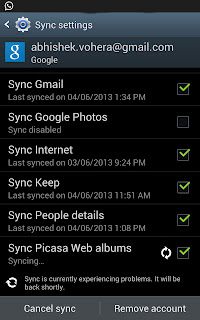
The first step to do the following task is to stop syncing activity, it can be done by going to settings option and then to accounts sub-heading – where it will display which all accounts are being sync regularly with the phone. Then Select Google Account or The Dropbox account , after it go to the syncing accounts and over there a long list will be displayed of all the activities that are being synced with the smartphone. Over there go to the last option which will be the “Sync Picasa Web Albums” – You need to uncheck it. You need to do the same for Dropbox also.
Step 2 : Clear Gallery Data
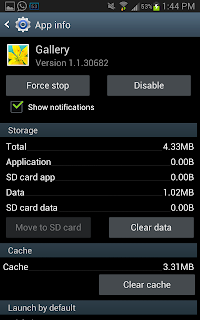
Dear friends now the second step is to clear the gallery data and the cache. Now the syncing of Albums is stopped so the new albums will not be displayed, but we need to remove the old albums which were already synced. To do this we need to go to the Setting -> Application Manager -> All apps -> Gallery. Now this screen like this will display and then you need to just tap on the Clear Data and Clear Cache.
Step 3 : Open The Gallery
Guys, the two important steps are done now, the simple thing which is left now is to open thegallery and refresh it. Refreshing it will display all the albums and images which are present on the external card or internal memory. Now you are done with the steps and you have successfully removed Picasa and Dropbox album from the Gallery.
So we are done with steps and now the question is Do you prefer to have the Picasa and Dropbox album in your smartphone gallery and make your gallery loaded with lots of unnecessary albums and pics OR just follow this steps and make your gallery simpler and easy to use and find the images.

How To

HOW TO REMOVE PICASA AND DROPBOX ALBUM FROM ANDROID GALLERY

Unknown  |  at  08:33


Do you get annoyed when you search for the picture or a video and you didn’t find it easily due to all extra images added into your gallery by Picasa Web Album for the Dropbox Instant Upload. Don’t you feel to delete all of them from the gallery or hide it from there. You might also get the thought that it would delete the images from the web also, then what should you do to hide  or delete  picasa dropbox  albums from gallery.
This two things that is Picasa and Dropbox make your gallery loaded with lots of unnecessary albums and pics and makes it difficult for you to find the important picture when you are in need of it.
Here are the few simple steps that would hide the images and albums from the gallery and also wont delete them from the respective server.


Step 1 : Stop Syncing Activity
 
The first step to do the following task is to stop syncing activity, it can be done by going to settings option and then to accounts sub-heading – where it will display which all accounts are being sync regularly with the phone. Then Select Google Account or The Dropbox account , after it go to the syncing accounts and over there a long list will be displayed of all the activities that are being synced with the smartphone. Over there go to the last option which will be the “Sync Picasa Web Albums” – You need to uncheck it. You need to do the same for Dropbox also.
Step 2 : Clear Gallery Data
Dear friends now the second step is to clear the gallery data and the cache. Now the syncing of Albums is stopped so the new albums will not be displayed, but we need to remove the old albums which were already synced. To do this we need to go to the Setting -> Application Manager -> All apps -> Gallery. Now this screen like this will display and then you need to just tap on the Clear Data and Clear Cache.
Step 3 : Open The Gallery
Guys, the two important steps are done now, the simple thing which is left now is to open thegallery and refresh it. Refreshing it will display all the albums and images which are present on the external card or internal memory. Now you are done with the steps and you have successfully removed Picasa and Dropbox album from the Gallery.
So we are done with steps and now the question is Do you prefer to have the Picasa and Dropbox album in your smartphone gallery and make your gallery loaded with lots of unnecessary albums and pics OR just follow this steps and make your gallery simpler and easy to use and find the images.


The Indian smartphone company Xolo have launched a new smartphone named on its Q series – Xolo Q3000 and it is also available for pre-order on various e-commerce site all around the web. The online retailer says that the Xolo Q3000 android phone will be available by January 4, 2014. However, there is no official word on the pricing and availability of Xolo Q3000.  But the sites have started taking the pre-orders.


The Xolo Q3000 is a dual-SIM (GSM + GSM) device which runs Android 4.2 Jelly Bean.  The Xolo Q3000 continues the Q-series tradition and is powered by a 1.5GHz quad-core MediaTek MT6589T processor. The Xolo Q3000 is correct choice if you are looking for a good big size screen phone i.e. phablet . User can buy the Xolo Q3000 android phone from Flipkart.com at best deal offer. You can also book pre-order on infibeam.com
SpecificationPriceSimilar Phone
Front Camera : 5-megapixel
Resolution : 1080×1920 pixels
RAM : 2GB
OS : Android 4.2
Storage : 16GB
Rear Camera : 13-megapixel
Battery capacity : 4000mAh
News

XOLO Q3000 PHABLET NOW AVAILABLE FOR PRE-ORDER AT RS. 20,999

Unknown  |  at  08:24


The Indian smartphone company Xolo have launched a new smartphone named on its Q series – Xolo Q3000 and it is also available for pre-order on various e-commerce site all around the web. The online retailer says that the Xolo Q3000 android phone will be available by January 4, 2014. However, there is no official word on the pricing and availability of Xolo Q3000.  But the sites have started taking the pre-orders.


The Xolo Q3000 is a dual-SIM (GSM + GSM) device which runs Android 4.2 Jelly Bean.  The Xolo Q3000 continues the Q-series tradition and is powered by a 1.5GHz quad-core MediaTek MT6589T processor. The Xolo Q3000 is correct choice if you are looking for a good big size screen phone i.e. phablet . User can buy the Xolo Q3000 android phone from Flipkart.com at best deal offer. You can also book pre-order on infibeam.com
SpecificationPriceSimilar Phone
Front Camera : 5-megapixel
Resolution : 1080×1920 pixels
RAM : 2GB
OS : Android 4.2
Storage : 16GB
Rear Camera : 13-megapixel
Battery capacity : 4000mAh

Tuesday, 24 December 2013


Just few hours ago the smartphone company Sony announced that they are rolling out Android 4.3 Jelly Bean update for Xperia android phone such as Xperia Z,  Xperia ZL, Xperia ZR and Xperia Tablet Z. Even few days ago Sony Xperia Z1 and Z ultra have received the same Android 4.3 Jelly Bean update.


his android update also include many updates to the sony apps and have added few new apps to its list . This Android 4.3 Jelly Bean update for Xperia series  includes Sony’s Smart Social Camera, which offers special camera apps like the ability to stream live video to Facebook as well as Timeshift Burst, an app that can snap 61 photos in 2 seconds.
It is also included with the updates are refreshed versions of all of Sony’s native apps, including Messaging, MyXperia, Small Apps and its WALKMAN, Album and Movies entertainment apps.The final app update is for the Battery STAMINA Mode, this app have received an user interface change and have added some more functionality to to make battery run for long time.

For the Sony Xperia Z Tablet , the update have increased user control  with “Restricted Profiles”; option to create isolated, secure spaces with individual local storage, home screens, widgets and settings.
The Company also says that the Android 4.3 Jelly Bean Update are coming to its remaining devices soon. This is a good news for the Sony Smartphone users and hope their new devices will soon get the 4.4 KitKat update too.
Have you received the Android 4.3 update on your Xperia yet? What improvements have you see so far? Let Us know by commenting below. 
Via : Sony Blog
News

SONY ROLLS OUT ANDROID 4.3 JELLY BEAN UPDATE FOR XPERIA Z, XPERIA ZL, XPERIA TABLET Z AND XPERIA ZR

Unknown  |  at  10:46


Just few hours ago the smartphone company Sony announced that they are rolling out Android 4.3 Jelly Bean update for Xperia android phone such as Xperia Z,  Xperia ZL, Xperia ZR and Xperia Tablet Z. Even few days ago Sony Xperia Z1 and Z ultra have received the same Android 4.3 Jelly Bean update.


his android update also include many updates to the sony apps and have added few new apps to its list . This Android 4.3 Jelly Bean update for Xperia series  includes Sony’s Smart Social Camera, which offers special camera apps like the ability to stream live video to Facebook as well as Timeshift Burst, an app that can snap 61 photos in 2 seconds.
It is also included with the updates are refreshed versions of all of Sony’s native apps, including Messaging, MyXperia, Small Apps and its WALKMAN, Album and Movies entertainment apps.The final app update is for the Battery STAMINA Mode, this app have received an user interface change and have added some more functionality to to make battery run for long time.

For the Sony Xperia Z Tablet , the update have increased user control  with “Restricted Profiles”; option to create isolated, secure spaces with individual local storage, home screens, widgets and settings.
The Company also says that the Android 4.3 Jelly Bean Update are coming to its remaining devices soon. This is a good news for the Sony Smartphone users and hope their new devices will soon get the 4.4 KitKat update too.
Have you received the Android 4.3 update on your Xperia yet? What improvements have you see so far? Let Us know by commenting below. 
Via : Sony Blog

Thursday, 19 December 2013

People are totally connected to their smartphone now a days, they can rarely  leave their Smartphone somewhere apart from them.There are also many secrets Young generation keep in their Smartphone. Specially its our friends who are more interested in our mobile rather their own and as if no one likes to reveal what they talk with their friends on whatsapp or to hide the call logs from their family member or from their friends.But the Smartphone doesn’t provide any extra lock apart from the stock lock which includes Pin ,Pattern and Password lock your apps with which most of you are used to.But if once that is unlocked no further locks are provided. So people find a application which can help with their problem but then people get confused which application is to be downloaded among those 100′s of them.So here we solve the problem and give you Top 3 application to hide your applications.


This application is the most common application downloaded from Google play when it comes to locking any application. It has most number of install in app lock category.This application feature Protecting every application with Pin Or Password, A widget on a home screen to quickly access the locking and unlocking, Locks on outgoing and incoming calls,Lock on Google play store,Prevent the app from being uninstalled, Hide app icon from launcher,Quick lock switcher on status bar , and many more amazing features.The premium version includes more amazing features some of those are change keyboard color,Ramdom keyboard ,Hide AppLock icon.This pplication is rated 4.6 by thousands of users.This application is just worth 1 mb. So over-all its a Short and sweet application with many useful feature.

This application had been recently updated which added many new features to it.It is available in two versions Paid and a Free version. This application includes various kinds of lock such as pattern lock , digits lock and the most unique feature which most of the app lock doesn’t provide gesture lock screen. This application has more amazing features like to lock the usage of 3G data so that no one can use your data without your prior notice.Apart from this features this app lock also provides locks on call setting which includes locks on outgoing or incoming call as desired.This application is a way better than other because it contains a location service which means when you are at your home place as registered it automatically unlocks every app and automatically locks all the apps when you are away from your registered home place it automatically locks apps which are set to be locked.This application is rated 4.6 by its more than 100000 users.

This is also a amazing application to lock your applications. This application has Installs over 100000.It has many feature which includes Locking any application with a Pattern or Pin,Screen filter support(Contoll brightness),Rotation lock support,USB to PC connection lock support (Requires password for connection of phone to PC),Minimum resource used,Remotely start service using a text command and some more features.This application has the same features which are featured in free version apart from the paid version doesn’t contain add.It is not supported in Small Sized Smartphones like HTC Wildfire and other small screen phones. This application can be translated to other language by contacting the developers here : ” This Perfect App Protector application is rated 4.7 by 180984 users.
Top 3 Games and Apps

TOP 3 APPLICATIONS TO LOCK GAMES & YOUR APPS

Unknown  |  at  10:03

People are totally connected to their smartphone now a days, they can rarely  leave their Smartphone somewhere apart from them.There are also many secrets Young generation keep in their Smartphone. Specially its our friends who are more interested in our mobile rather their own and as if no one likes to reveal what they talk with their friends on whatsapp or to hide the call logs from their family member or from their friends.But the Smartphone doesn’t provide any extra lock apart from the stock lock which includes Pin ,Pattern and Password lock your apps with which most of you are used to.But if once that is unlocked no further locks are provided. So people find a application which can help with their problem but then people get confused which application is to be downloaded among those 100′s of them.So here we solve the problem and give you Top 3 application to hide your applications.


This application is the most common application downloaded from Google play when it comes to locking any application. It has most number of install in app lock category.This application feature Protecting every application with Pin Or Password, A widget on a home screen to quickly access the locking and unlocking, Locks on outgoing and incoming calls,Lock on Google play store,Prevent the app from being uninstalled, Hide app icon from launcher,Quick lock switcher on status bar , and many more amazing features.The premium version includes more amazing features some of those are change keyboard color,Ramdom keyboard ,Hide AppLock icon.This pplication is rated 4.6 by thousands of users.This application is just worth 1 mb. So over-all its a Short and sweet application with many useful feature.

This application had been recently updated which added many new features to it.It is available in two versions Paid and a Free version. This application includes various kinds of lock such as pattern lock , digits lock and the most unique feature which most of the app lock doesn’t provide gesture lock screen. This application has more amazing features like to lock the usage of 3G data so that no one can use your data without your prior notice.Apart from this features this app lock also provides locks on call setting which includes locks on outgoing or incoming call as desired.This application is a way better than other because it contains a location service which means when you are at your home place as registered it automatically unlocks every app and automatically locks all the apps when you are away from your registered home place it automatically locks apps which are set to be locked.This application is rated 4.6 by its more than 100000 users.

This is also a amazing application to lock your applications. This application has Installs over 100000.It has many feature which includes Locking any application with a Pattern or Pin,Screen filter support(Contoll brightness),Rotation lock support,USB to PC connection lock support (Requires password for connection of phone to PC),Minimum resource used,Remotely start service using a text command and some more features.This application has the same features which are featured in free version apart from the paid version doesn’t contain add.It is not supported in Small Sized Smartphones like HTC Wildfire and other small screen phones. This application can be translated to other language by contacting the developers here : ” This Perfect App Protector application is rated 4.7 by 180984 users.

General

© 2013 Tech Smoothy Converted by BloggerTheme9
Powered by Blogger.